Every Monday looks the same in most ad accounts. Someone exports last week from Ads Manager, pastes it into a sheet, scrolls through the creatives to remember which one was which, and writes three lines in Slack about what won. By the time the recap is done, the morning is gone and nobody has decided what to make next.
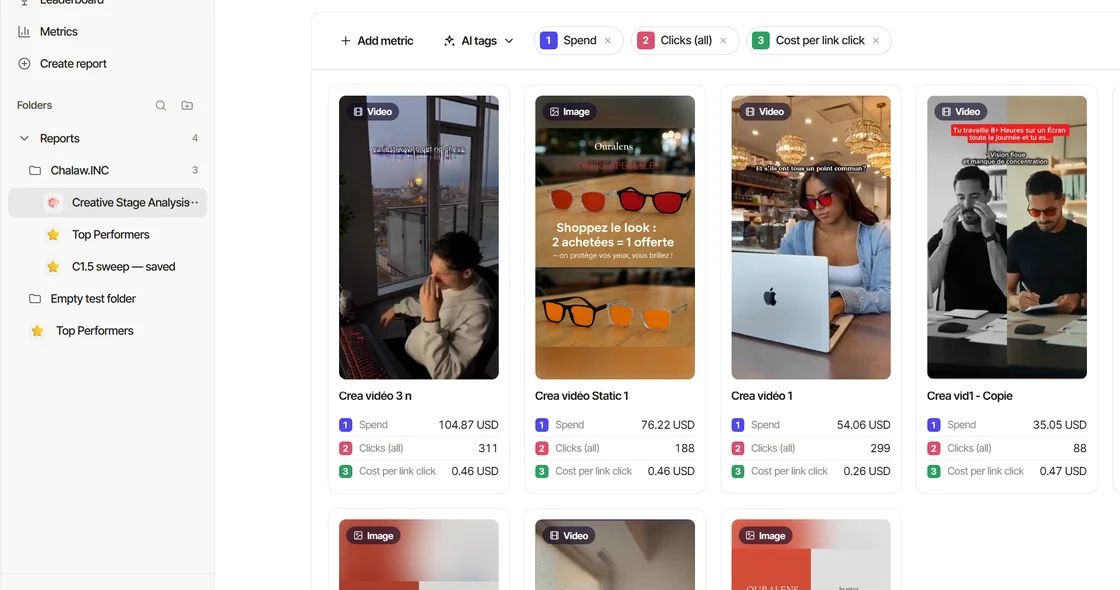
Creativity already does the first half of that: it syncs your Meta ads every hour, groups the variations of a creative into one row, and tags every creative with AI (its hook, angle, visual format, persona and more). What was missing was the conversation. Today you can have it in Claude.
Connect once, pick the brand
In Creativity, open Settings → Account → Connect AI and press Add to Claude. Claude opens its connector window with everything filled in; you press Add, sign in to Creativity, and pick the workspace this connection reads. One connection, one brand: Claude never wanders into another client's numbers, and you switch brands in Creativity when you need to.
That's the whole setup. The same connection works in Claude on the web, the desktop app, Cowork and the iPhone app. Connect Claude has every step.
Browse the Creativity skills in Connect AI
In Creativity, Settings → Account → Connect AI → Skills holds the strategist plugin: one Download the plugin, then Customize → Plugins → Add in Claude. Here are the 10 skills it brings, the ones Claude uses to give you a full, thorough, detailed analysis of your creatives and ads:
- Creativity Connector: reaches your Creativity data, reads its numbers the right way, and colours your AI tags as Creativity does.
- Brand Intake: your brief and the brand context document.
- Creative Analysis: what was tested, why the winners won, the bottleneck, the next hypotheses.
- Review Audit: the comments under your ads and the reviews on the web, in the customers' own words.
- Creative Strategy Engine: pains × personas × angles × awareness stages.
- Hook Writing: hooks for your lead angles.
- Hook Tactics: the same angle across the tactics, for a hook test.
- Hook Voice Patterns: hooks in the feed's native voice.
- Creative Mechanics: the structure that turns an angle into a concept.
- Visual Formats: the format each concept should be shot in.
Ask the way you'd ask a strategist
You don't need a prompt. Ask what you'd ask a colleague who has the account open:
- "What were my best ads last week, and why?"
- "Which hooks work best for us, and which have we never tried?"
- "What are my competitors running right now?"
Claude answers from Creativity's own numbers, the same ones the console shows you, with the date of the last sync. It never computes a number of its own: when a value is missing, it says so and says why.
Your ads, playable, with their tags
When the answer is about creatives, it doesn't come back as a list of ad IDs. Claude shows a gallery right in the chat: each ad playable, with its spend and results, and its AI tags in the same icons and colours as in Creativity. Tap a card and its detail opens in place: every tag, the transcript, the ad copy. Full screen groups the tags the way the console does, under Visual, Persona, Messaging and Hook.
It's the fastest way I know to go from "this angle is winning" to actually seeing the five ads that carry it.
Claude looks at the ads, not just the numbers
Numbers tell you that an ad won. To say why, you have to watch it. Claude can now look at your ads: Creativity sends it the image of a static ad, and for a video a storyboard, the video's frames in one grid with their timestamps, next to the transcript. Ask "What happens in the first three seconds of my best ad?" and the answer is about the ad, not a guess from its name.
The comments are customer research
The comments under your ads are the most honest research you have, and nobody reads them all. Connect your Facebook Page and Claude can: the comments under your own Facebook and Instagram ads, newest first. In Tunisia, a pile of "بقداش؟" and "prix?" under one ad usually means the price isn't in the ad; Claude counts them for you.
It gets the text only. Phone numbers, emails and @mentions are masked, and Claude never learns who wrote a comment.
The weekly review, as a report
With the Creativity strategist plugin (the 10 skills above), Claude also gets five commands. /weekly-review pulls the last seven days fresh, against the seven before, and comes back as a report next to the chat: the verdict, the numbers with their change, your creatives ranked, your AI tags charted in Creativity's colours, the angles that win and the ones you've never tested, and the hypotheses for next week's production. The chat keeps the verdict and three next steps; pick one by its number and Claude does it.
/audit does the same for an account you're taking over, /monthly-review steps back on money and structure, and /strategy-run walks the whole method, from the brand brief to a ranked test plan, one step at a time. Your routine puts them in order.
Your saved reports, kept up to date
If you let it, Claude can also manage your saved reports: create the one your team opens every Monday, change its filters ("only creatives that spent at least 50"), delete the ones nobody reads, and restore one deleted by mistake. It's off until you turn on Allow edits for that connection, and a deleted report is always restorable.
What it will never do
- Touch Meta. Creativity's access to your ad account is read-only, and so is everything Claude does through it. Your campaigns change in Ads Manager, by you.
- Invent a number. Every figure is a stored value. Missing is missing.
- Read another brand. One connection reads one workspace.
- Share or publish anything. Edits stay inside your saved reports, and only when you allow them.
Try it
AI assistants come with the Standard plan and its free trial. Connect Claude from Settings → Account → Connect AI, brief it on your brand once (here's how), and ask about last week. Then tell me what you asked first: I read every reply.