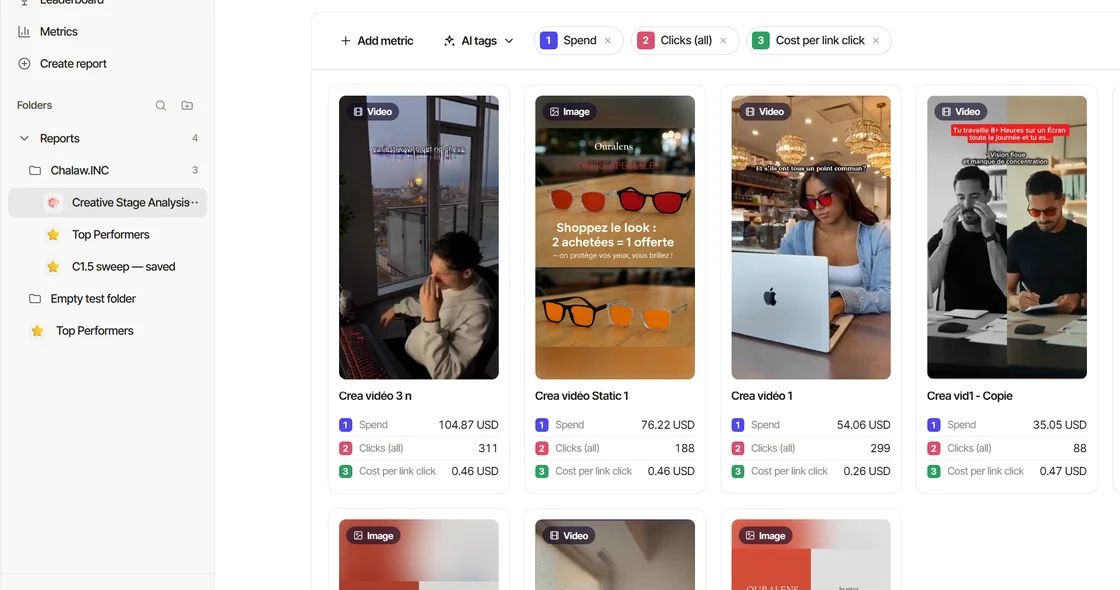
Just talk to Claude like you normally would. The Creativity skills switch on by themselves when your request matches what they do, and the Creativity connector gives Claude your Meta ads, your creatives with their AI tags and transcripts, your saved reports and the competitor ad library. This page is the short version. The deeper guides are linked at the end.
Before you start: connect Claude to Creativity and add the strategist plugin from Settings → Account → Connect AI → Skills.
Set up one Claude Project per brand
- Build the brand context first. In a new chat, ask Claude to "Run brand intake for [brand name]". Every other skill gets smarter once this exists. Claude asks only what it can't find, researches the brand and writes a brand context document.
- Approve it, then download it. Read the document, correct anything that's off, and download it.
- Create a Claude Project for the brand. Add the brand context document to the Project's files, and paste this into the Project's instructions (replace the brackets):
You're the creative strategist of [brand name]. You have the brand's context in the Project files. You're connected to Creativity's connector, your only source of ad data and creatives. You have the creative strategy skills installed. Our purpose is to analyze [brand name]'s ads and build a creative strategy system for it.
Every chat you open in that Project now starts from the brand, not from zero. One Project per brand (or per client, for agencies).
Prompts to try
Copy, paste, replace the [brackets].
- Build brand context (run first for a new brand): "Run brand intake for [brand name]" or "Build brand context for [brand]."
- Analyze customer reviews: "Analyze these customer reviews." Then paste the reviews.
- Map your creative strategy: "Map my creative strategy." "Help me come up with new messaging angles for a new audience." "Help me unlock new audiences for this product."
- Develop an ad concept: "I have a hook and a pain point. Help me turn it into a full ad concept with a clear visual structure."
- Choose a visual format: "What format should this be?" or "Give me format options for this concept."
- Get hooks to test: "Give me a wide variety of hooks for [product]. I want options I can test against each other."
- See what's working in your ads: "Which of my creatives are winning, and why?" or "What angles have we already tested?"
How the skills work together
The skills work best as one workflow, and you can run all of it in a single conversation. Keep building on what Claude gives you.
- Brand Intake: the brand context document every other skill relies on.
- Review Audit: customer reviews and the comments under your ads, mined for pains, what finally made people buy, what almost stopped them, and the exact words they use.
- Creative Strategy Engine: pain and desire buckets, personas and messaging angles, built on the reviews and the brand context.
- Creative Mechanics: the structural approach for how each ad gets its message across.
- Visual Formats: the production format (video or static, and which type) that best delivers the concept.
- Hook Writing: your angles and concepts turned into opening lines for each awareness stage.
- Hook Tactics and Hook Voice Patterns: a wider hook range, or a more native feel to the language.
- Creative Analysis: reads your performance data, finds what's winning and why, and feeds the next round of ideas.
The five slash commands
Slash commands are shortcuts for checking and reviewing your live ad account. Type / in the chat, pick one and press Enter. You can add a note after it, like /weekly-review for 1 to 15 October.
/daily-check, every morning before opening Ads Manager: a 30-second scan of yesterday's spend, ROAS, CPA, CPM, CTR and more against the day before and the last 7 days. It flags what looks off; it doesn't tell you what to change./weekly-review, once a week to plan what to produce next: your strongest creatives; winning, disproven and untested angles; the current bottleneck; and 3 to 10 hypotheses for your production queue. Report included./monthly-review, at month end for the big picture: the month's best concept, angle, offer, persona, format and proof, the biggest deterioration, and the profitable spend ceiling. Report included./audit, for a new account or when results feel stuck: the last 90 days of creatives mapped, each angle labeled Explore, Exploit, Iterate or Abandon, plus what limits profitable growth. Report included./strategy-run, for a new brand or a full restart: the whole method, one step at a time (brand intake, creative analysis, customer research, strategy, hooks, concepts, formats and a ranked test plan). It waits for your OK between steps.
Every command ends with three next steps. Reply 1, 2 or 3 to continue, or just tell Claude what you want instead.
Which one do I need? A quick check on the numbers: /daily-check. Deciding what to make this week: /weekly-review. Looking back on a month: /monthly-review. Taking over an account: /audit. Starting from zero: /strategy-run.
Asking about your ad data
- See account results: "How did the account perform in the last 7 days vs. the 7 before?"
- Find winners and losers: "Show me my top 10 creatives by ROAS and what they have in common."
- Understand what's working: "Which hooks, formats and angles drive my best results?" (it uses the AI tags on each ad)
- Keep a report: "Save this as a report" or "Show my saved reports"
- Get help with Creativity: "How do AI tags work in Creativity?"
To get better answers, name the period ("last 30 days"), the metric you care about (ROAS, CPA) and your target if you have one. Claude can't guess your margin or your goals.
Tips
- Give context once, then build on it. Brand, product, audience and goal. Claude remembers within the chat, and the Project keeps the brand across chats.
- Be specific. "Women 25–35 who hate the gym" gets better hooks than "fitness people".
- Paste real customer words. Reviews and comments are the best raw material for hooks.
- Ask for variety when testing. "Give me a wide variety I can test against each other."
- Not right? Say why. "Too salesy, make it sound like a friend" works better than starting over.
- Lost? Ask "What should I do next?" or "Which skill fits this?"
Cheat sheet
- Start a new brand: "Run brand intake for [brand]"
- Do the whole strategy:
/strategy-run - Understand my customers: "Analyze these customer reviews"
- Find new angles: "Map my creative strategy"
- Pick a format: "What format should this be?"
- Check today's numbers:
/daily-check - Plan this week's production:
/weekly-review - Review the month:
/monthly-review - Audit an existing account:
/audit
Go deeper
- Get the most out of Creativity in Claude and ChatGPT: the brief, the nine skills, the full strategy run, agencies.
- The prompt library: ready-to-use asks for every skill, and the chained asks.
- Your daily, weekly and monthly routine: the cadence, and how to schedule each command.